5 Creative Sampling Techniques to make a Sample your own
Sampling is at the heart of modern music production, but the magic lies in making that sample truly yours. Whether you’re flipping a dusty old loop or scooping something digital, there are countless ways to transform raw audio into something original and exciting. Below are five powerful techniques to help you reshape and reinvent samples, complete with practical tips and tools.
1. Chopping and rearranging
This is perhaps the most classic sampling technique. By chopping up a sample and rearranging its parts, you can breathe new life into existing material while still retaining its character. Here’s a step-by-step approach:
- Load or record the sample into your DAW or hardware sampler,
- Pre-Chopping housekeeping make sure your sample sits neatly on the grid.
- Slice the sample using one of these methods:
Transient slicing cuts at peaks in the waveform.
Beat slicing divides the sample into even bar-based intervals.
Manual slicing place markers by hand for ultimate control. - Check your slice points to ensure tight timing and clean cuts.
- Map slices to a MIDI controller (pads or keyboard) so you can perform them live.
- Experiment with order and playback try reversing, pitching up/down, or stretching slices.
- Record arrangements into your sequencer, paying attention to sample endings so that you avoid unwanted gaps or overlaps.
- Combine try mixing short, choppy hits with longer sustained slices for contrast.
- Adjust pitch or tempo to keep everything grooving in time with your track.
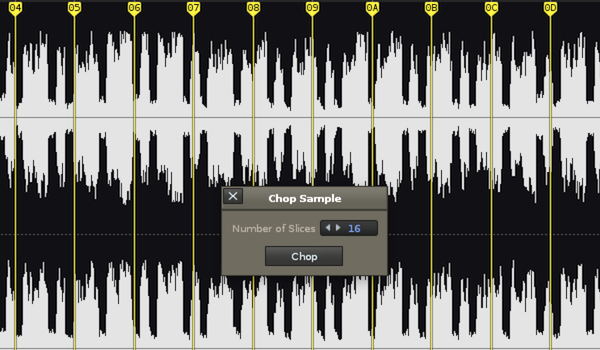
Pro Tip: Sometimes it works best to chop first, then build a drum track around your new pattern. Other times, laying down drums first can guide your chopping choices. The key is experimentation. Record plenty of variations and keep the ones that work best.
2. Changing the Musical Scale
If you want to take a sample somewhere completely new, changing its scale can be a game-changer. This requires specialised software that can separate polyphonic audio into individual notes and instruments. Once isolated, you can re-map those notes to entirely new scales.
At a basic level, you might convert a major scale into minor, instantly transforming a happy-sounding loop into something moodier. But you don’t need to stop there. Try more esoteric scales like Middle Eastern maqams or pentatonic Chinese scales, to inject a cultural flavour into your productions.
This technique is not always predictable. Sometimes it creates magical new harmonies; other times it introduces dissonance or digital artefacts. But that unpredictability is part of the fun.
Here are two powerful tools for scale manipulation:
- Melodyne 5 Editor – Industry-standard for polyphonic pitch correction, with deep scale control.
- Zynaptiq Pitchmap – Real-time scale and pitch manipulation for quick, intuitive results.

3. Stem Separation
Stem separation is one of the most exciting developments in modern music production. It allows you to peel away layers of a stereo sample, such as vocals, drums, bass, and melodies, and work with them individually. Many DAWs (like Logic Pro, Serato Sample and now Ableton Live 12) now include this natively, and there are also powerful standalone tools such as iZotope RX, LALAL.Ai and the totally free Ultimate Vocal Remover
Here are three ways to get creative with stems:
- Musical arrangement: Drop different elements in and out throughout your track. Use filters or volume automation for more dynamic and interesting builds and drops.
- FX processing: Apply effects only to certain elements. Like distorting a bassline, delaying a sax riff, or glitching a vocal.
- Audio-to-MIDI conversion: Convert separated parts into MIDI and reassign them to new instruments. For example, turn a sampled bass into a synth bass, or swap piano chords for a lush string section.
4. MIDI layering
Adding your own instrumentation is one of the simplest yet most effective ways to personalise a sample. VST instruments open up endless possibilities. Whether you want to complement the original vibe or contrast it with something unexpected, layering can provide the key – literally! While the sample provides the foundation, your MIDI parts can add depth, texture, or even completely redefine the direction of the track.
Here are three effective ways to layer your samples to make them your own.
- Reinforcement of existing elements
Identify the strongest part of your sample—whether it’s a chord progression, bassline, or lead melody—and reinforce it with a new instrument. For example, doubling a piano part with a mallet instrument can make it feel more percussive. Or layering some subtle fuzz-bass synth beneath a sampled bassline can give the low end more punch and presence in a club mix. - Adding new melodic or harmonic content
You don’t have to stick to what’s already there. Add counter-melodies, harmonies, or entirely new rhythmic layers to complement the sample. If the sample is lush and melodic, try layering an arpeggiator or sequenced synth pattern to bring movement and energy. If it’s minimal, you could introduce atmospheric pads or textures to fill the space. - Textural sound design
Layer instruments that don’t necessarily play the same notes as the sample, but instead provide texture. Think of airy vocal chops under a synth loop, a vocoded harmony running parallel to a guitar sample, or ambient soundscapes that add depth without being too obvious.
As touched upon in the previous part, a key trick here is using audio-to-MIDI conversion tools. These allow you to extract the pitch and timing information directly from your sample and map it to a new virtual instrument. This ensures your MIDI parts lock tightly with the groove and harmonic content of the original. Popular DAWs like Ableton Live and Logic Pro offer this feature natively, making it easy to generate MIDI material from any audio source.
5. One-Shot Processing
So far we have been looking at this through the lens of sample loops. But how about One Shot samples? Be it a drum hit, synth stab, bass notes, or vocal ad lib, there are countless ways to give one-shot samples a unique twist.
Here are a few creative approaches:
- Drums
Take a simple kick, snare, or hi-hat hit and breathe life into it with processing. Adding subtle pitch modulation can make repeated hits sound less robotic. Saturation or tape emulation can add warmth and character. For something more experimental, layer multiple hits together (like an acoustic snare with a heavily reverbed clap) to create entirely new hybrid drums that feel unique to your track. - Synths and stabs
A static synth stab can be reshaped into something dynamic with effects like tremolo, chorus, phasers, or modulation. Granular processors can stretch a stab into an evolving pad, while pitch shifting can turn a bass note into a high lead or vice versa. Even a single note can become the basis for an evolving soundscape with enough creative processing. - Vocals
Vocal one-shots are a goldmine for texture. Take an ad-lib or shout and run it through long reverbs, reversed delays, or formant shifting to turn it into an ambient layer. Extreme pitching can push a vocal into the realm of a synth-like instrument. Try chopping and layering vocal snippets rhythmically to add percussive energy, or stretch them out to create haunting drones.
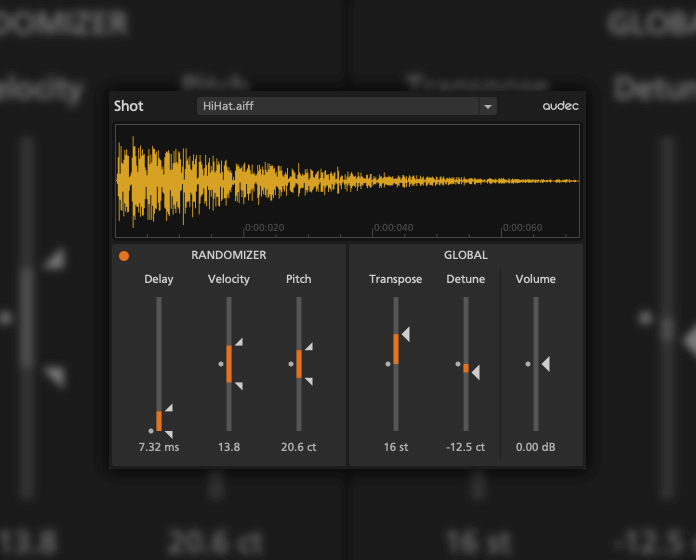
One of the best ways to think about one-shots is to treat them like raw presets. Sounds that are waiting to be molded. Instead of dropping them into a track unchanged, view them as starting points that can be sculpted to suit your needs, helping them to seamlessly blend with the mood of your project.
Pro Tip: Pay close attention to dynamics when processing one-shots. Small changes like adjusting attack and release in your sampler can completely alter the character of a sound, turning a punchy drum into a softer thud, or making a pluck sound like a swelling pad. These subtle tweaks are often what make one-shots sit perfectly in the mix.
Final Thoughts
The beauty of sampling lies in its flexibility. With techniques like loop chopping, scale shifting, stem separation, MIDI layering, and one-shot processing, you can turn even the most familiar sample into something fresh and unmistakably yours.
The golden rule? Experiment, experiment, experiment. The more you push boundaries, the more original your productions will sound.
And if you are looking for Beats or Samples for your next project then RouteNote Create has you covered. sign-up now and take your music to the next level