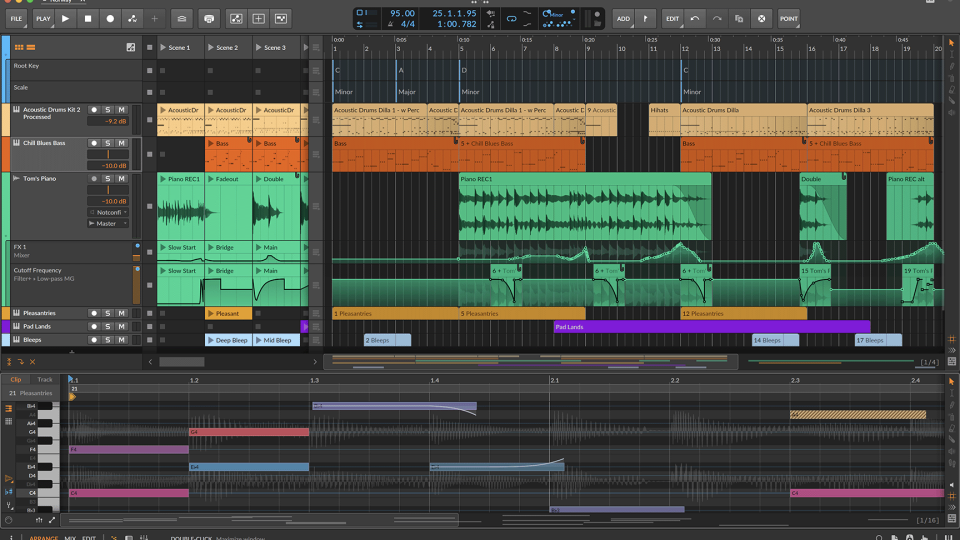
Bitwig Studio 6 is officially out now: Here’s everything new since the beta
Back in August, we wrote a post that gave you a glimpse of Bitwig 6 as it entered public beta. We highlighted some of the big-hitting features, such as Automation Clips, Clip Aliases, and the long-awaited Global Key Signature.
Now that the full version has dropped, Bitwig has announced some “under-the-hood” refinements and tools that we didn’t cover in the initial announcement. Lets die into what you need to know about the final release.
Utility Toolkit
This updated interface comes with its own Tool Palette on the right hand side, and has some interesting new additions:
- Spray Can: This feature was built for speed, letting you paint notes or automation points directly onto the grid. It’s ideal for hi-hat rolls and rhythmic automation in just a few moments.
- Step Input: It now has its own Step Input mode. You can now enter notes (and even full chords) one by one for ultra-precise melodic programming.
- Audition: Preview any clip or individual note in the timeline without having to hit play on the project.
Precision Editing: Layered & Expression Overhaul
The Detail Editor Panel has also seen a few welcome changes:
- Side-By-Side Editing: Note and Audio lanes can now be viewed side-by-side, making it much easier to align a recorded vocal with a MIDI synth pattern.
- On-Clip Expressions: No more menu diving to edit MPE data. Edit these values directly on the notes or audio waveforms in the timeline.
- Arranger Auto Zoom: A clever little tweak that helps workflow, when enabled the track you select automatically expands so you can see what you’re doing, while other tracks shrink to save screen real estate.
New Grid Modules
There are four new modules in The Grid that have been designed specifically to work with the new Global Key system:
- Scale & Scale Steps: Quantise your patches to the project’s key or shift pitches by scale degrees rather than semitones.
- Root Key & Pitch Class: These modules allow your modular patches to “listen” to the project’s global settings and stay perfectly in harmony.
Automatic Backups
The new Project Safety feature is super practical. When you open a project created in an older version of Bitwig, the software will automatically create a permanent backup of the original file. This should give you total peace of mind when migrating your old hits into the Version 6 engine.
Pricing & availability
Bitwig Studio 6 is a free upgrade for all users with an active Upgrade Plan. It is available for Bitwig Studio, Producer, and Essentials tiers. Get it directly from the Bitwig website.
Remember – RouteNote Create subscriptions start from as little as $2.99.
You can also purchase full sample packs, beats and plugins without a subscription