Temperance Pro – Eventides’ new plugin, they claim, is the world’s most musical reverb
Eventide back with Temperance Pro – a paid ‘full version’ of their recent freebie, Temperance Lite. This new version dials up the same ground-breaking modal reverb engine to eleven, giving you a bunch more control over how reverberant spaces react musically inside your mix.
How it works
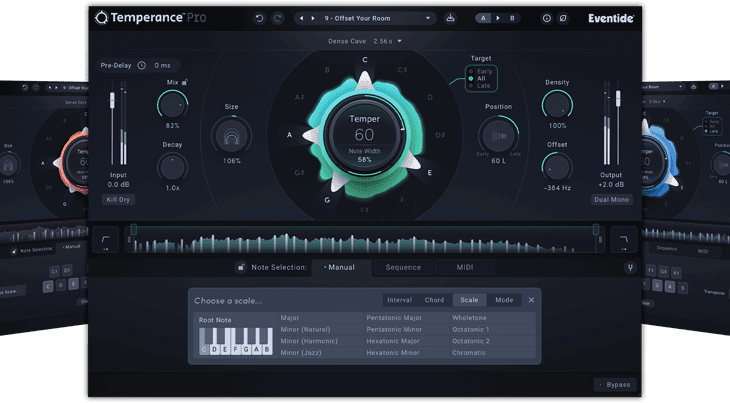
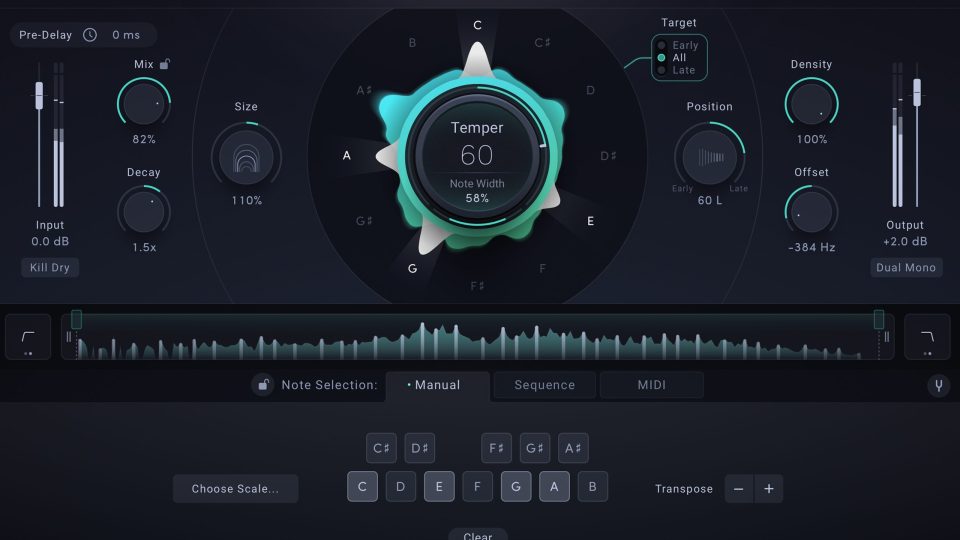
Throw out everything you know about how traditional reverbs work. Temperance Pro works by operating on the 12-note chromatic scale, putting you in control of which notes bloom or fade in the reverb tail. Resulting in reverbs that feel musical – not just spatial.
You can shape tonal movement, sculpt texture, and explore 29 stunning spaces.
Control the Shape
The Temper and Range controls are where the musical journey begins. They directly adjust how strongly the plugin emphasises or tames specific notes and which octaves get the treatment. Then you’ve got Target and Note Width for deeper control – perfect for tailoring tempering across different sounds, whether you’re producing in the studio or performing live.
Target Select
Use Target Select to decide when the tempering kicks into focus the action on Early (at the reverb onset), Late (during the reverb tail), or All (both onset and tail).
Preset Spaces
Out of the box, Temperance Pro provides you with 29 stunning spaces – from tight, intimate rooms to cinematic halls, lush mechanical ambiences, and even experimental synthetic environments.
Eventide used a patented machine-learning process to convert algorithmic and convolution reverbs into the modal domain.
You’ll find some authentic recreations of legendary rooms (some designed by acoustics pioneer Ralph Kessler), plus original Eventide-built spaces that really show off the full potential of what modal reverb technology can really do.
Modal Controls
Familiar reverb parameters are present – Mix, Decay, and Size. But we see the addition of, Density, Position, and Offset which bring the modal magic, shaping ambience in a way that feels instrument-like.
3 Note Selection Modes
Take total command of motion. The Note Selection panel lets you decide which notes drive the movement – manually, via programmed sequences, or by triggering them in real-time with MIDI.
Key Features
- Low latency: Great for recording and for live performamce.
- Reference tuning adjustment: You can match tempered notes to your music.
- Dual Mono Mode: Keeps your stereo image centered.
- Range Sliders: Control specific frequency bands precisely.
- Fully automatable controls: For precise adjustments and perfect integration into your DAW’s automation lanes.
- Input & Output level faders with metering
- NoteScape Visualizer: Visually maps the musicality of the reverb by displaying the emphasised and de-emphasised notes when they’re sustaining and decaying.
- Kill Dry: This Switch will cut any incoming audio signal, allowing your reverb tails to ring out.
- Notes Lock: Enabling this allows you to browse presets with your current note selection settings.
- Mix Lock: Enabling this allows you to browse presets with your current mix settings
- A Spectrum Analyzer: To display the direct output of all the modes used in the Modal Response.
- Eco Mode: Turn on for more efficient CPU performance
- A/B Setting: Comparison states with “Copy to other” button
System Requirements
Windows:
Windows 10+, x64
AAX 64-bit, VST3 64-bit
A CPU that supports SSE 4.2 is required
macOS:
macOS 10.14+, Intel and Apple Silicon
AAX 64-bit, AU 64-bit, VST3 64-bit
iLok Account is required – no physical dongle necessary.
Should be compatible with all major DAWs.
Pricing & Availability
Temperance Pro is available directly from the Eventide website for $179 (USD).